AP AND TRANSFER CREDIT (IBB, ETC.)
AP Credits
Students who have earned the appropriate scores on AP exams may earn college credit, and in many cases these credits may apply towards degree/major requirements.
Students cannot receive credit for the same class twice, so it is important for students to review their AP credits against their schedule, and to check for duplicates.
Advanced Placement Comparability Guides & How To Send AP Scores to UVM
Transfer Credits
Students who have completed college credit from other universities, dual-enrollment, IBB, etc, may earn transfer credit towards their degree.
Reviewing Transfer Credit
Once transfer/AP credit has been put on your UVM transcript, you can review it your myUVM account in the “Academic Records” card. You will see a “Transfer Credits” link on the left side of the page.
PLACEMENTS TESTS (MPA & FLP)
You are required to take the Math Placement Assessment if:
- You need or want to take calculus (MATH 1212, MATH 1234, etc.)
The Math Placement Assessment is used to determine which mathematics course you should begin with in order to have the greatest success. If you are entering UVM with AP credit (Calculus AB or BC) and plan to take any calculus course (MATH 1212, 1224, 1234, 1248, or 2248), you still need to take the Placement Assessment.
You are required to take the Foreign Language Placement Test if:
- You plan to enroll in your first Spanish or French class at UVM. You must enroll in the course level recommended.
You must take the test even if you’ve never formally studied the language.
Students who are not required to take the MPA or FLP, but are still unsure/considering their options can feel free to take both placement tests, just in case!
REGISTRATION ERRORS
Registration errors may happen for a variety of reasons while trying to enroll. Here are some common errors and how to avoid to them:
- Registration Holds
Some holds on a student’s account may prevent registration. See the Registrar’s list of Common Holds.
- Time Conflict
If the class you are trying to register for conflicts with the day(s)/time(s) of another class you are registered for, the system will not let you register and you will get a time conflict error. When selecting classes, be sure that you are not choosing any with overlapping meeting times.
- Prerequisite
Some classes require prerequisite coursework (specific classes that need to be completed prior to enrolling). If you do not have the required prerequisite(s), the system will not allow you to enroll. When selecting classes, you can check for prerequisites to see if you are eligible to enroll. Prerequisites can be found by clicking the “CRN” of a class in the schedule of courses, or in the class description in the UVM catalog.
- Restrictions: Program/Major/Minor, Class Standing
Some classes are restricted to students in specific program/colleges, majors or minors. Restrictions can be found by clicking the “CRN” of a class in the schedule of courses.
- Linked Courses
Some classes have “linked” sections, such as courses with labs. If a class has a “linked” section (i.e. a mandatory lab) you must register for both a class lecture section AND a lab at the same time. The system will not let you enroll in one at a time. Information about any linked sections can by found by clicking the “CRN” of a class in the schedule of courses.
- Max Credits
Full-time tuition includes up to 19 credits. The system will not let you enroll in more than 19 credits without permission from your Dean’s Office.
WORLD LANGUAGES AND CULTURES CLASSES
Students are strongly encouraged to begin their world language study in their first semester. To encourage this, the School of World Languages and Cultures has developed a process for classes that are at capacity.
If the language class you had planned to register for is full (or “closed”) during your course registration advising Appointment, here’s what to do: Send an email to the School of World Languages and Cultures at swlc@uvm.edu and indicate the course number and section letter (for example: FREN 2100, section B). Someone will then follow up with you about it.
Even if you do not yet have a spot in the class by the first day of classes, please go to the class and talk to the instructor after class. Instructors are often willing to provide an override to those who do not yet have one at that point.
UVM offers classes in 10 different world languages, so you’re encouraged to also consider taking a different language (that has space) if your first choice is full. You can choose from Chinese, French, German, Greek, Hebrew, Italian, Japanese, Latin, Russian, and Spanish.
(Please note: this process is only for World Language classes.)
CHANGE OR DECLARE MAJOR/MINOR
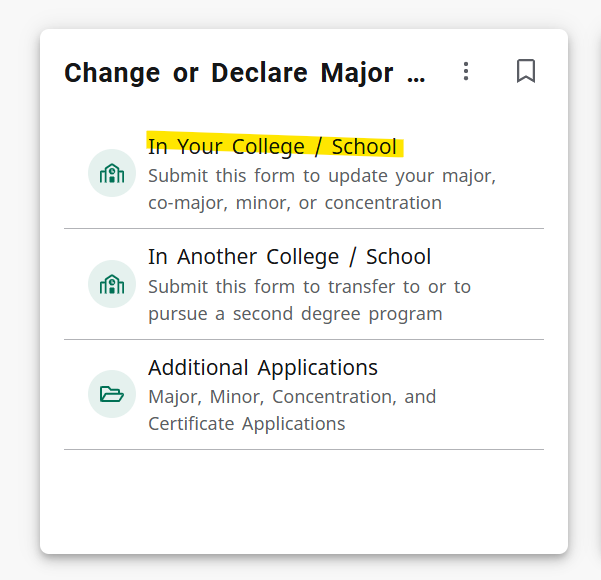
If you know you want to change or declare your major or minor, you can fill out the “In Your College” form under the “Change or Declare Major” card in your MyUVM portal.
If you are hoping to declare a studio art major or minor, note that the department has an application process. The advisor you meet with can explain that process and the required courses you will need to complete before you can declare.